TMS Confidential backends
The information in this page has deprecated, we never went with managed instance groups!
Confidential backends are instances in a Managed Instance Group (MIG).
Github repository
[
github.com
https://github.com/Attracs/terraform-tms-confidential-compute
](https://github.com/Attracs/terraform-tms-confidential-compute)
Updating the backends
Updates are delivered via the template-instance: 1. Start the template-instance (it should be off if not used) 2. Make changes 3. Stop the instance 4. Make an image out of it's disk 5. Click "Copy" on the latest instance template that's in use by the instance group
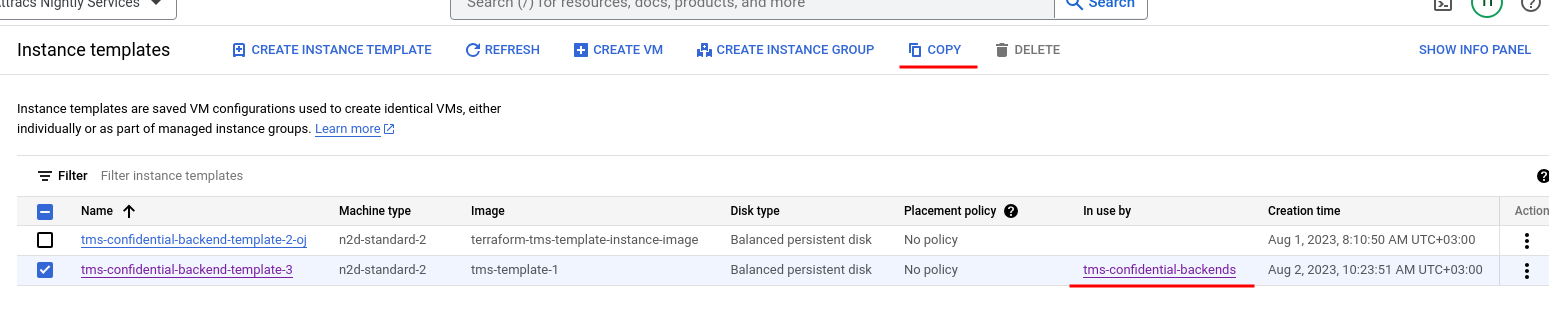
- Change the boot disk image to be the new updated image you just made
- Make sure that
Confidential VM service,Secure BootandvTPMoptions are on (They've sometimes gotten disabled)- ~~
Integrity Monitoring~~ is disabled for now as it causes issues with updates
- ~~
- Open the Update VMs page inside of the instance group and change the instance template to use your new instance template. Before applying, check the update configuration's update strategy so that it is Automatic and "Actions allowed to update VMs" that it is Only replace.
- Apply the new instance template, you should see X amount of instances be created with the new instance template to support the update process. The old instances will slowly within a few a minutes get destroyed and replaced by instances of the new instance template.
Troubleshooting
Add confidential backends -specific if any applicable.
Generic troubleshooting steps
GCP Managed Instance Groups (https://app.clickup.com/2496230/docs/2c5q6-69975/2c5q6-217255)