SSL certificate renewals: Meshmoon
⚠️ Legacy (DigiCert-era). SSL certificate renewal has moved to one current, unified process — Let's Encrypt automation + Ahola Group Vault (https://vault.aholagroup.com/), ~90-day certs. See: SSL certificate renewals: Current process (2026). This page is kept for reference only.
CURRENTLY PLEASE NOTE THAT OFFICE NETWORK FOR SOME REASON BLOCKS THIS SSH CONNECTION. NEED TO USE OTHER NETWORK TO GET TO THIS SERVER!
Always a good practice to take backup of the cert before running new one over. Backup can be done with CP command. https://fvs-services.meshmoon.com/
ssh ssh root@144.76.201.87
certbot certonly --server https://acme-v02.api.letsencrypt.org/directory --manual --preferred-challenges dns -d *.meshmoon.com
# followe instruction to do the DNS challenge
cd /etc/haproxy
cat /etc/letsencrypt/live/meshmoon.com/privkey.pem /etc/letsencrypt/live/meshmoon.com/fullchain.pem > wildcard.meshmoon.com.pem
service haproxy reload
# test for cert errors
curl https://fvs-services.meshmoon.com
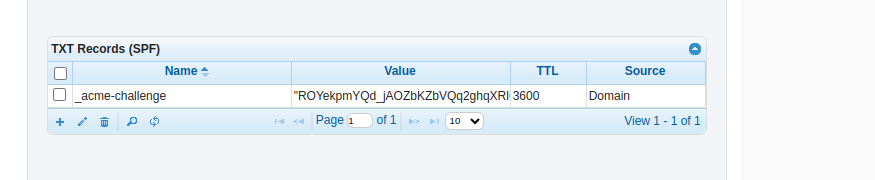
DNS challenge that the certbot wants means that you need to update TXT record in dnsmadeeasy meshmoon.com domain. Challenge will give you the new value.
~~Logon to meshmoon iis -server (148.251.183.166)~~
~~Using Admin Powershell start c:\win-acme.v2.0.4.227\wacs.exe~~
Select (S) Renew specific
Select 1 [IISBinding] services.meshmoon.com
To check certificate alerts: