GCP Logs Router sink
Cloud audit logs
Google Cloud provides four types of audit logs for each project, folder, and organization in your environment:
* Admin Activity audit logs contain log entries for API calls or other administrative actions that modify the configuration or metadata of resources. This is useful for tracking administrative activities and changes made to the configuration of resources.
* Data Access audit logs contain API calls that read the configuration or metadata of resources and user-driven API calls that create, modify, or read user-provided resource data. This is valuable for monitoring access to data, including who is reading or modifying resource configurations and user-provided data.
* System Event audit logs contain log entries for Google Cloud administrative actions that modify the configuration of resources. The Google system generates these audit logs, which helps track system-level administrative actions that impact the configuration of resources.
* Policy Denied audit logs are recorded when a Google Cloud service denies access to a user or service account because of a security policy violation.
*
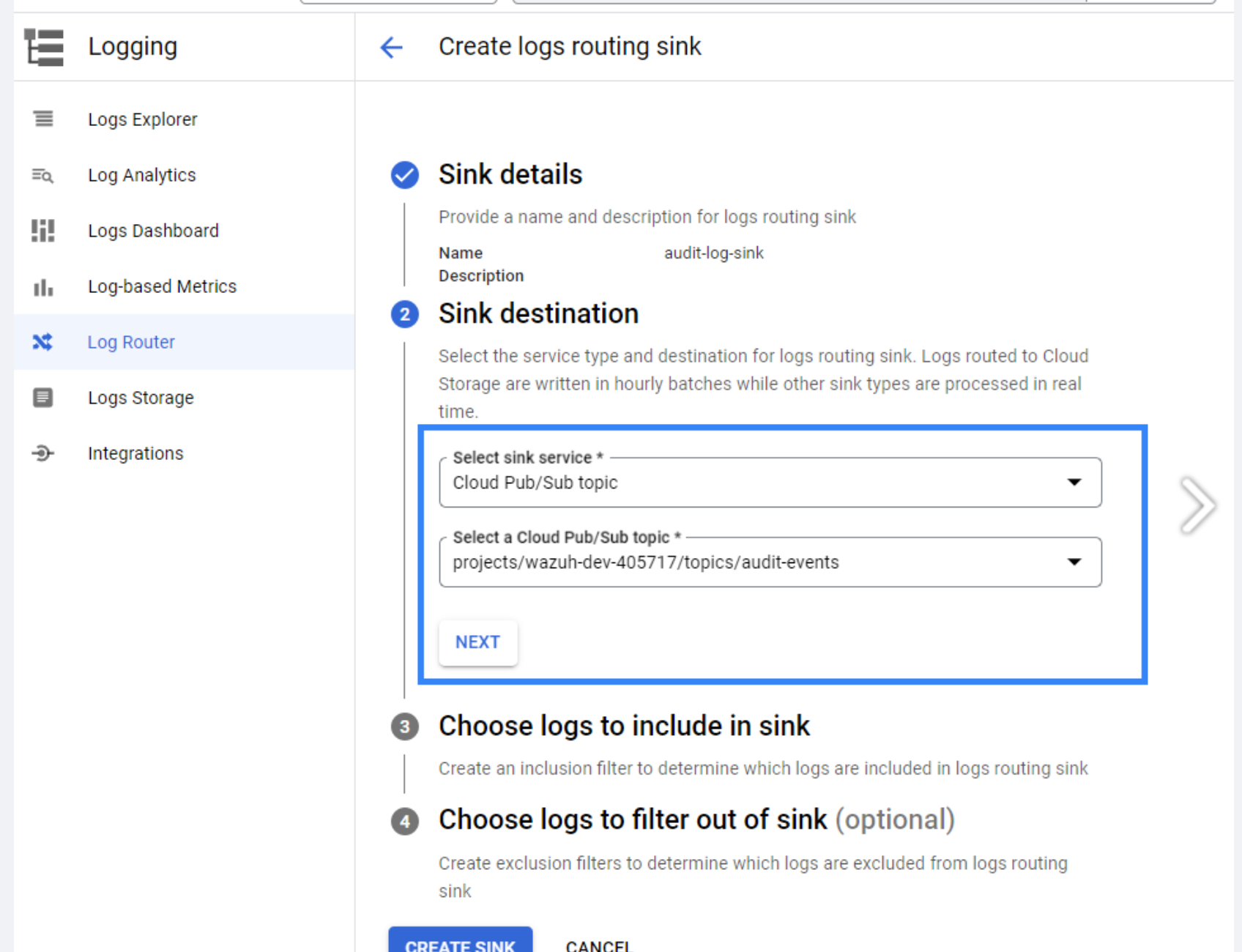 1. Go to Logging router create sink
1. give name audit-log-sink
2. Select Cloud Pub/Sub topic.
3. create query for only audit flags
1. Go to Logging router create sink
1. give name audit-log-sink
2. Select Cloud Pub/Sub topic.
3. create query for only audit flags
logName=~("projects/.*/logs/cloudaudit.googleapis.com%2F(activity|data_access|system_event|policy)")