Update EdgeWebview2
Check Edge WebView2 version from HostServers 0-4:
- Login to server
- open settings →A_pplications_ →
- expand → Mictosoft Edge WebView2 Runtime
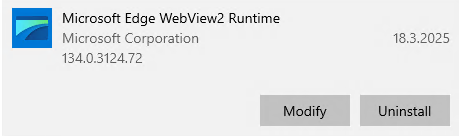
Or via PowerShell * Directly from server * open PowerShell as admin
Get-ChildItem "C:\Program Files (x86)\Microsoft\EdgeWebView\Application\" -Directory | Select-Object Name
- From jump server
- open PowerShell as admin
PS C:\Windows\system32> Enter-PSSession -ComputerName rdshost-4
[rdshost-4]: PS C:\Users\TEMP\Documents> Get-ChildItem "C:\Program Files (x86)\Microsoft\EdgeWebView\Application\" -Directory | Select-Object Name
>>

Name
----
134.0.3124.51
134.0.3124.72
SetupMetrics

[rdshost-4]: PS C:\Users\TEMP\Documents> exit
Install or update the WebView2 Runtime:
- Go to page https://developer.microsoft.com/en-us/microsoft-edge/webview2/.
- Scroll down to section Evergreen Bootstrapper or Fixed verision select Download > Accept and Download.
- Find the executable file in your Downloads folder, right-click it and select Run as administrator.
- Run Powershell as admin and locate to downloaded file and run it
- Enter your administrator credentials. The installation starts and is completed in the background.
We could update WebView2 during the day, update will not affect users when they have client open.