ORY
Ory provides social logins (Microsoft, Google) to auth.attracs.com login. * attracs-auth uses an access_token to execute admin actions though ory API (go SDK) * attacs-auth redirects user to self-service login flows in our custom ory domain ory-auth.attracs.com (CNAME) * attracs-auth handles ory callbacks after successful login * links ory identity to exising auh0 account with the same email address OR creates a new "dummy" backing auth0 account * fetches the associated auth0 account, puts link metadata to both ory and auth0 metadata * builds JWT auth tokens. the format/structure is identical to auth0 access and id JWT. this means our apps dont have to care which login was used. * ory stores and protects JWK private keyset for us. These keys are used to cryptocrafically sign attracs-auth authored JWT tokesn that we set in our auth cookie. * keyset is created manually through their CLI with name "adi-auth", thse cannot be done from web console. attracs-auth server fetches these keys with name on server start (go SDK). * attracs-auth exposes the public part of these keys at https://auth.attracs.com/.well-known/jwks.json for JWT validation (that all our apps do)
attracs-auth YML config section
ory:
  access_token: "<personal_accss_token>"
Login console to connect to https://console.ory.sh/
Microsoft azure token needs to be refreshed before 03.01.2027
AZURE * create new client secret https://portal.azure.com/#view/Microsoft_AAD_RegisteredApps/ApplicationMenuBlade/~/Cr[…]s/appId/e1a8b7e1-493b-4d4e-bad8-0b8d8f9655e6/isMSAApp~/false
ORY
* open microsoft https://console.ory.sh/projects/0c1eef5d-05d8-429f-8f45-d7c3a16a52eb/social-signin
* Select project Ahola-digital-auth
* Select authentication tab
* Select Social Sign-in
* Click on the highlighted section
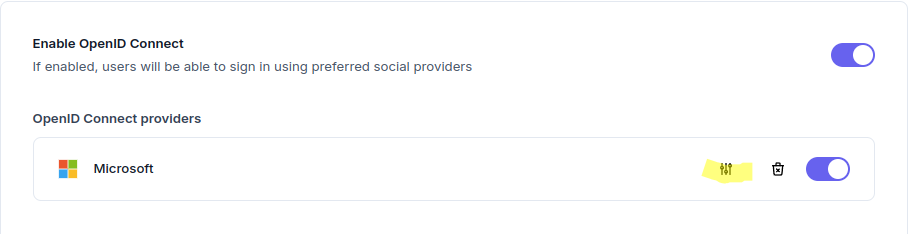 * * * * In the new menu →update "Client Secret" with change button
* Second project that has this certificate is tms-booking customers (dev/old) This is used for TMS-bookings customers that are not in manage. Same process as the another one for updating the certificate.
* * * * In the new menu →update "Client Secret" with change button
* Second project that has this certificate is tms-booking customers (dev/old) This is used for TMS-bookings customers that are not in manage. Same process as the another one for updating the certificate.