SSL certificate renewals: *.aholadigital.com
⚠️ Legacy (DigiCert-era). SSL certificate renewal has moved to one current, unified process — Let's Encrypt automation + Ahola Group Vault (https://vault.aholagroup.com/), ~90-day certs. See: SSL certificate renewals: Current process (2026). This page is kept for reference only.
What need to update (at least):
* common-servers-01:
* https://console.cloud.google.com/security/ccm/list/lbCertificates?project=common-servers-01
* stable-biztalk-01:
* https://console.cloud.google.com/security/ccm/list/lbCertificates?project=stable-biztalk-01
* nightly-biztalk-01:
* https://console.cloud.google.com/security/ccm/list/lbCertificates?project=nightly-biztalk-01
* stable-servers-01:
* https://console.cloud.google.com/security/ccm/list/lbCertificates?project=stable-servers-01
* nightly-servers-01:
* https://console.cloud.google.com/security/ccm/list/lbCertificates?project=nightly-servers-01
* attracs-devops:
* https://console.cloud.google.com/security/ccm/list/lbCertificates?project=attracs-devops
* attracs-logistics-nightly-6519:
* https://console.cloud.google.com/security/ccm/list/lbCertificates?project=attracs-logistics-nightly-6519
* attracs-logistics:
* https://console.cloud.google.com/security/ccm/list/lbCertificates?project=attracs-logistics
* adi-eazytms-nightly
* https://console.cloud.google.com/security/ccm/list/lbCertificates?project=adi-eazytms-nightly
* adi-eazytms-stable
* https://console.cloud.google.com/security/ccm/list/lbCertificates?project=adi-eazytms-stable
Important details about new certificates
Please read this important section here:
Check certificate validity
- for example with these commands from ao nightly lb:
Quick validity check (subject, issuer, dates):
echo | openssl s_client -servername lb-road-nightly.aholadigital.com -connect lb-road-nightly.aholadigital.com:443 2>/dev/null | openssl x509 -noout -subject -issuer -dates
Days remaining until expiry:
echo | openssl s_client -servername lb-road-nightly.aholadigital.com -connect lb-road-nightly.aholadigital.com:443 2>/dev/null | openssl x509 -noout -checkend 0 && echo "Not expired"
Full certificate details (incl. SANs):
echo | openssl s_client -servername lb-road-nightly.aholadigital.com -connect lb-road-nightly.aholadigital.com:443 2>/dev/null | openssl x509 -noout -text
Using curl (verifies chain too):
curl -vI https://lb-road-nightly.aholadigital.com 2>&1 | grep -E "(expire|subject|issuer|SSL)"
GCP:
to do: missing how to unlock an encrypted / password-protected file that we sometimes get from Ahola IT / Vesa
Take new certificate from ahola groups vault: https://vault.aholagroup.com/ui/vault/secrets/certs/kv/issuer%2Faholadigital.com * fullchain * key
- Download/copy files to folder
- use command to make it .pem :
cat star_aholadigital_com.crt DigiCertCA.crt > star_aholadigital_com.pem
- Cat
aholadigital.pemand private key - Go to GCP projects (above) Certificate Manager ➝ classic certificate
- Create SSL Certificate
- Name it
- upload/copy star-aholadigital-com.crt + DigiCert
- cat .pem and copy private key
- Create SSL Certificate
- Go to Load Balancing
- Select loadbalancer and edit:
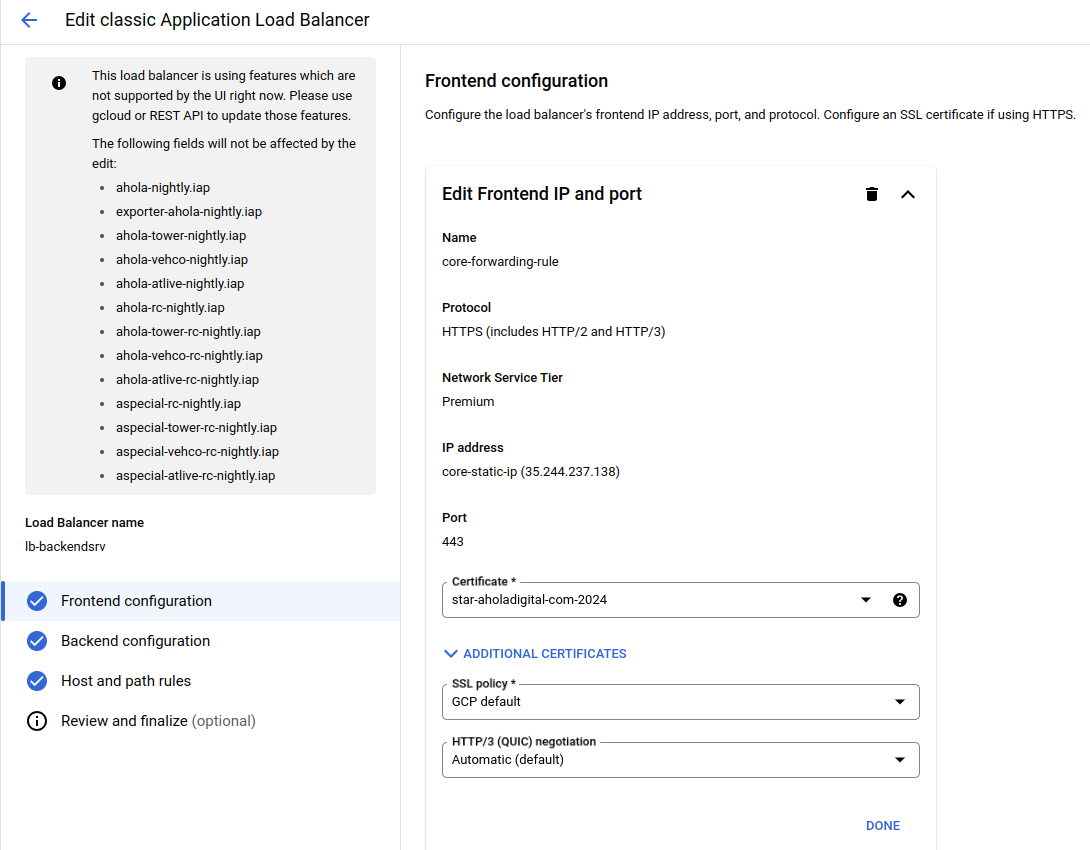
- Choose new Certficate and update Load Balancer
- Check new cert: (biztalk)
[
integrationservices.aholadigital.com
https://integrationservices.aholadigital.com/
](https://integrationservices.aholadigital.com/)
[
integrationservices-test.aholadigital.com
https://integrationservices-test.aholadigital.com/
](https://integrationservices-test.aholadigital.com/)
Hetzner:
-
When you have new cert
-
Login to Hetzner
- On the left side panel →
- Security →Certificates tab
- Add new certificate
- Left side panel →
- Load Balancers →Services Tab
- three dots → edit service → update new certificate → save
Troubleshooting
Certificate validity: