Docusaurus
Ahola Digital Playbook (securitymanagement.attracs.com) is built on top of a Docusaurus docker container.
devops.4
CONTAINER ID   IMAGE                                                                                    COMMAND                  CREATED         STATUS         PORTS                                                                                         NAMES
3e65065d2ba9   docker-docusaurus_cron-job                                                               "crond -f -d 8"          9 months ago    Up 8 weeks                                                                                                   docker-docusaurus_cron-job_1
e776debe9590   docker-docusaurus_docusaurus-iso27                                                       "docker-entrypoint.s…"   9 months ago    Up 8 weeks     0.0.0.0:5102->9000/tcp, :::5102->9000/tcp                                                     docker-docusaurus_docusaurus-iso27_1
e053382e062d   nginx                                                                                    "/docker-entrypoint.…"   9 months ago    Up 4 minutes   0.0.0.0:5103->80/tcp, :::5103->80/tcp                                                         docker-docusaurus_nginx_1
devops.5
CONTAINER ID   IMAGE                                                                                    COMMAND                  CREATED         STATUS         PORTS                                                                                         NAMES
7db1c79702a7   docker-docusaurus_cron-job                 "crond -f -d 8"          9 months ago    Up 8 weeks                                                         docker-docusaurus_cron-job_1
01e0417b5bda   docker-docusaurus_docusaurus-iso27         "docker-entrypoint.s…"   9 months ago    Up 8 weeks             0.0.0.0:5102->9000/tcp, :::5102->9000/tcp   docker-docusaurus_docusaurus-iso27_1
Building Docusaurus webpages
Docusaurus is automatically built from the Github repository (how?).
Manually re-building Docusaurus
If docusaurus build crashes (won't update from github to isms) you have to check from the devops.4 server if the build has failed.
ssh attracs.devops.4
sudo docker exec -it docker-docusaurus_docusaurus-iso27_1 /bin/bash
cd /scripts
./clone_and_build.sh
With this script, it starts to build again. Then of course you have to do this to both devops.4 and devops.5
Note: You will have to fix the problem first if the build is failing due to an error.
Building Docusaurus docker container
In the repository, the version of the base image in the Dockerfile for the cron (alpine:3.6) is deprecated and needs to be updated (alpine:3.14 builds fine) in order for the docker container to build.
Troubleshooting: during build
./clone_and_build missing script: "build" error
If the clone_and_build.sh script fails to the following error:
npm error Missing script: "build"
It is because the npm init command in the docusaurus-dockerfile/Dockerfile saved the SecurityManagement/ directory somewhere else than /SecurityManagement and therefore the package.json is incorrect (running npx create-docusaurus@latest SecurityManagement classic may also help.)
So when this part of the clone_and_build.sh script happens:
# build statics
cd /SecurityManagement && npm run build
The npm run build command is unable to find a definition for run build in the package.json under /SecurityManagement/package.json.
broken package.json:
{
  "dependencies": {
    "@cmfcmf/docusaurus-search-local": "^1.2.0"
  }
}
working old package.json (installs Docusaurus 2.1.0:
{
  "name": "security-management",
  "version": "0.0.0",
  "private": true,
  "scripts": {
    "docusaurus": "docusaurus",
    "start": "docusaurus start",
    "build": "docusaurus build",
    "swizzle": "docusaurus swizzle",
    "deploy": "docusaurus deploy",
    "clear": "docusaurus clear",
    "serve": "docusaurus serve",
    "write-translations": "docusaurus write-translations",
    "write-heading-ids": "docusaurus write-heading-ids"
  },
  "dependencies": {
    "@cmfcmf/docusaurus-search-local": "^1.2.0",
    "@docusaurus/core": "2.1.0",
    "@docusaurus/preset-classic": "2.1.0",
    "@mdx-js/react": "^1.6.22",
    "clsx": "^1.2.1",
    "prism-react-renderer": "^1.3.5",
    "react": "^17.0.2",
    "react-dom": "^17.0.2"
  },
  "devDependencies": {
    "@docusaurus/module-type-aliases": "2.1.0"
  },
  "browserslist": {
    "production": [
      ">0.5%",
      "not dead",
      "not op_mini all"
    ],
    "development": [
      "last 1 chrome version",
      "last 1 firefox version",
      "last 1 safari version"
    ]
  },
  "engines": {
    "node": ">=16.14"
  }
}
new package.json (installs Docusaurus 3.6.0):
(you have to run the build with --legacy-peer-deps for this to work)
{
  "name": "security-management",
  "version": "0.0.0",
  "private": true,
  "scripts": {
    "docusaurus": "docusaurus",
    "start": "docusaurus start",
    "build": "docusaurus build",
    "swizzle": "docusaurus swizzle",
    "deploy": "docusaurus deploy",
    "clear": "docusaurus clear",
    "serve": "docusaurus serve",
    "write-translations": "docusaurus write-translations",
    "write-heading-ids": "docusaurus write-heading-ids"
  },
  "dependencies": {
    "@docusaurus/core": "3.6.0",
    "@docusaurus/preset-classic": "3.6.0",
    "@mdx-js/react": "^3.0.0",
    "clsx": "^2.0.0",
    "prism-react-renderer": "^2.3.0",
    "react": "^18.0.0",
    "react-dom": "^18.0.0"
  },
  "devDependencies": {
    "@docusaurus/module-type-aliases": "3.6.0",
    "@docusaurus/types": "3.6.0"
  },
  "browserslist": {
    "production": [
      ">0.5%",
      "not dead",
      "not op_mini all"
    ],
    "development": [
      "last 3 chrome version",
      "last 3 firefox version",
      "last 5 safari version"
    ]
  },
  "engines": {
    "node": ">=18.0"
  }
}
./clone_and_build cannot find module themes/github error
If you receive this error while running the clone_and_build.sh script:
Error: Cannot find module 'prism-react-renderer/themes/github'
it means you are missing the required themes github.js or .ts and dracula.js or .ts and you have to copy the files to /SecurityManagement/node_modules/prism-react-renderer/themes/.
Command:
mkdir -p /SecurityManagement/node_modules/prism-react-renderer/themes/
curl -o /SecurityManagement/node_modules/prism-react-renderer/themes/dracula.ts https://raw.githubusercontent.com/FormidableLabs/prism-react-renderer/master/packages/prism-react-renderer/src/themes/dracula.ts
curl -o /SecurityManagement/node_modules/prism-react-renderer/themes/github.ts https://raw.githubusercontent.com/FormidableLabs/prism-react-renderer/master/packages/prism-react-renderer/src/themes/github.ts
Troubleshooting: post build
Here are some Docusaurus-specific errors that have been documented.
What to search for in the logs:
From docker logs:
sudo docker logs docker-docusaurus_docusaurus-iso27_1 --tail 10000 2>&1 |grep -i "ERROR"
(we have to re-direct stderr to stdout using 2>&1 or else grep doesn't work)
If you see this
[ERROR] Client bundle compiled with errors therefore further build is impossible.
In this docker container's logs:
docker logs docker-docusaurus_docusaurus-iso27_1
It means that building Docusaurus resulted in an error and the build is incomplete.
502 Server Error
When trying to enter securitymanagement.attracs.com the page header gives you 502 Server Error and you are presented with this error:
 This error message is provided by a GCP Load Balancer, not nginx. (that however doesn't mean that the problem itself wont originate for example from nginx)
You can also confirm the error by visiting Load Balancing ➝ devops-lb and scrolling down to the backend called
This error message is provided by a GCP Load Balancer, not nginx. (that however doesn't mean that the problem itself wont originate for example from nginx)
You can also confirm the error by visiting Load Balancing ➝ devops-lb and scrolling down to the backend called securitymanagement-website
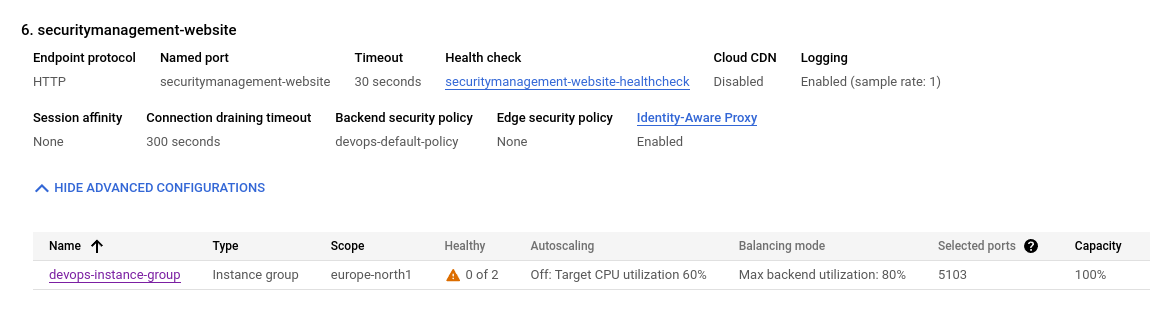 And finally, you can confirm the error by seeing if the docker logs for the docker container
 docker-docusaurus_nginx_1 claim that Google's Health Checks are not getting 200 OK (in this example 403 forbidden)
sudo docker logs docker-docusaurus_nginx_1 --tail 200
35.191.192.112 - - [18/Sep/2024:08:23:16 +0000] "GET / HTTP/1.1" 403 153 "-" "GoogleHC/1.0" "-"
2024/09/18 08:23:16 [error] 31#31: *156 directory index of "/var/www/html/" is forbidden, client: 35.191.192.112, server: _, request: "GET / HTTP/1.1", host: "10.166.0.47"
2024/09/18 08:23:18 [error] 31#31: *157 directory index of "/var/www/html/" is forbidden, client: 35.191.233.53, server: _, request: "GET / HTTP/1.1", host: "10.166.0.47"
35.191.233.53 - - [18/Sep/2024:08:23:18 +0000] "GET / HTTP/1.1" 403 153 "-" "GoogleHC/1.0" "-"
35.191.192.115 - - [18/Sep/2024:08:23:19 +0000] "GET / HTTP/1.1" 403 153 "-" "GoogleHC/1.0" "-"
How to fix this?
Likely you would have to re-run the Docusaurus clone and build script: Here is the typical compilation error that results in the application failing:
Error: Markdown link URL is mandatory in "docs/handbooks/compliance/Information Security Strategy.md" file (title: We regularly review our assets and access rights to our systems and data, line: 25).
[ERROR] Client bundle compiled with errors therefore further build is impossible.
Here is where it should appear in the script:
[WARNING] Error: Failed to retrieve the git history for file "/SecurityManagement/docs/handbooks/hr/roles/purchase director.md" with exit code 128: fatal: not a git repository (or any parent up to mount point /)
Stopping at filesystem boundary (GIT_DISCOVERY_ACROSS_FILESYSTEM not set).

Browserslist: caniuse-lite is outdated. Please run:
  npx update-browserslist-db@latest
  Why you should do it regularly: https://github.com/browserslist/update-db#readme

✖ Client
  Compiled with some errors in 16.78s

● Server █████████████████████████ building (64%) 1/1 entries 3448/3448 dependencies 1153/1153 modules 0 active

[WARNING] Docs markdown link couldn't be resolved: (/policies.md) in "/SecurityManagement/docs/handbooks/compliance/Information Security Strategy.md" for version current
[WARNING] Docs markdown link couldn't be resolved: (/policies.md) in "/SecurityManagement/docs/handbooks/compliance/Information Security Strategy.md" for version current

Error: Markdown link URL is mandatory in "docs/handbooks/compliance/Information Security Strategy.md" file (title: We regularly review our assets and access rights to our systems and data, line: 25).
[ERROR] Client bundle compiled with errors therefore further build is impossible.

Updates are available for some Google Cloud CLI components.  To install them,
You can ignore these warnings safely:
[WARNING] Error: Failed to retrieve the git history for file "/SecurityManagement/docs/intro.md" with exit code 128: fatal: not a git repository (or any parent up to mount point /)
Stopping at filesystem boundary (GIT_DISCOVERY_ACROSS_FILESYSTEM not set).