How to create and connect NetApp-Volumes
Google documentation: https://cloud.google.com/netapp/volumes/docs/configure-and-use/active-directory/about-ad?hl=en#required_permissions_to_create_active_directory_machine_accounts
Windows:
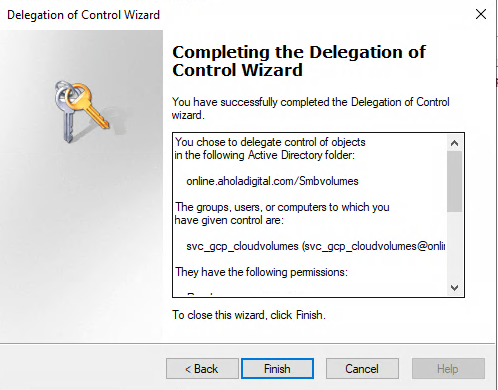
You need to give permission to svc_cloudvolume user. You can find it on AD and cloud volume ad.
Steps:
* open aduc and select View ➝ Advanced Features
* Select wanted OU (this case it was Smbvolumes) and right click on it
* select Delecate control and wizard opens.
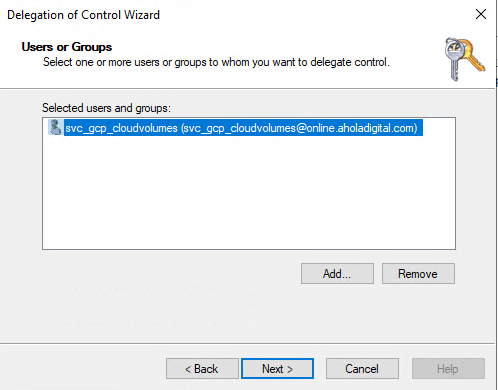
* Wanted user was svc_gcp_cloudvolume, which is also service account in GCP
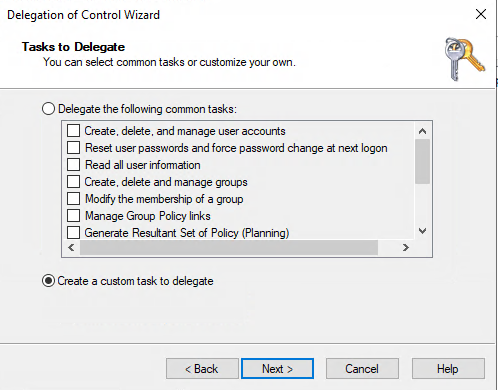
*  * Choose Create a custom task to delegate
*
* Choose Create a custom task to delegate
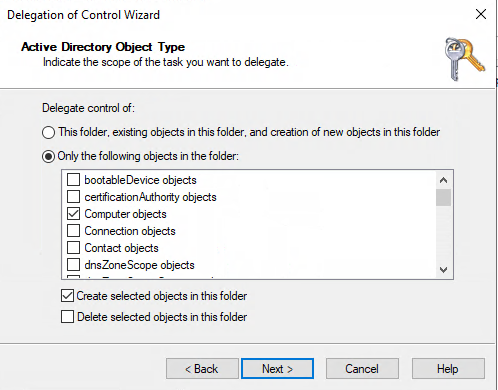
*  * Enable checkbox create to this folder ➝
 computer objects
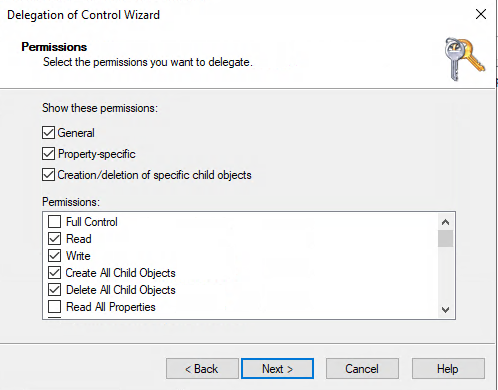
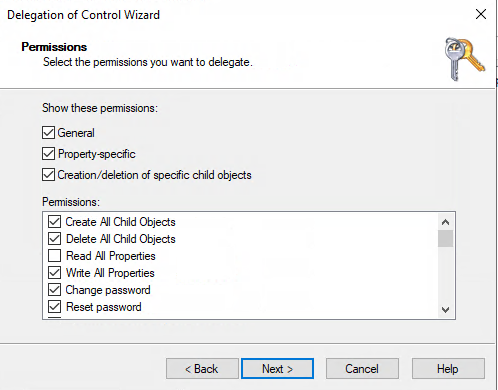
*  * Permissions:
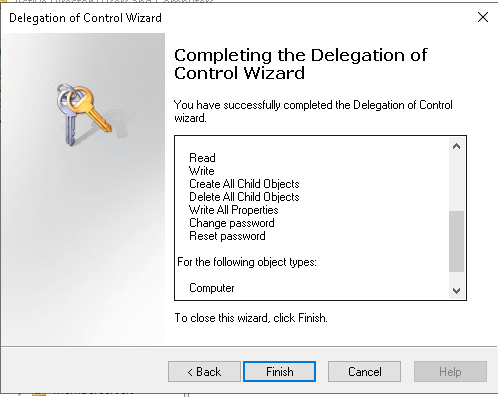
* Read, Write, Create and Delete Child Objects, Change and reset password
*
* Permissions:
* Read, Write, Create and Delete Child Objects, Change and reset password
*  *
*  * Summary:
*
* Summary:
*  *
*  * * You can check chosen permissions:
* (Advanced Features need to be picked)
* Right click wanted OU ➝ permissions
* Advanced permissions ➝ you can see given permission for this OU.
* * You can check chosen permissions:
* (Advanced Features need to be picked)
* Right click wanted OU ➝ permissions
* Advanced permissions ➝ you can see given permission for this OU.
NetApp cloud volume: * I created new Storage pool in GCP: https://console.cloud.google.com/netapp/cloud-volumes/storage-pools?orgonly=true&project=common-servers-01&supportedpurview=project * This setup was made almost basic setup, I made new Storage pool like older one. * Next I created new Cloud Volume in GCP: https://console.cloud.google.com/netapp/cloud-volumes/volumes?orgonly=true&project=common-servers-01&supportedpurview=project * This was also made like others. * After cloud volume was created successfully, go back in aduc * open wanted OU (this case it was Smbvolumes) ➝ here is new "computer" which is new netapp smb volume.
Last steps: * * go to DNS ➝ open View ➝ Advanced * In Forward Lookup Zones you will find that new smb volume. It has dynamic IP address. That need to be changed to static. * Right click wanted object ➝ disable "Delete this record when it becomes stale" by clicking the "Box". * Enable "Update associated pointer (PTR) record" by clicking the "Box". * Apply ➝ ok.