GCP Load Balancer: HTTP-to-HTTPS redirect
HTTP-to-HTTPS redirect with GCP LB
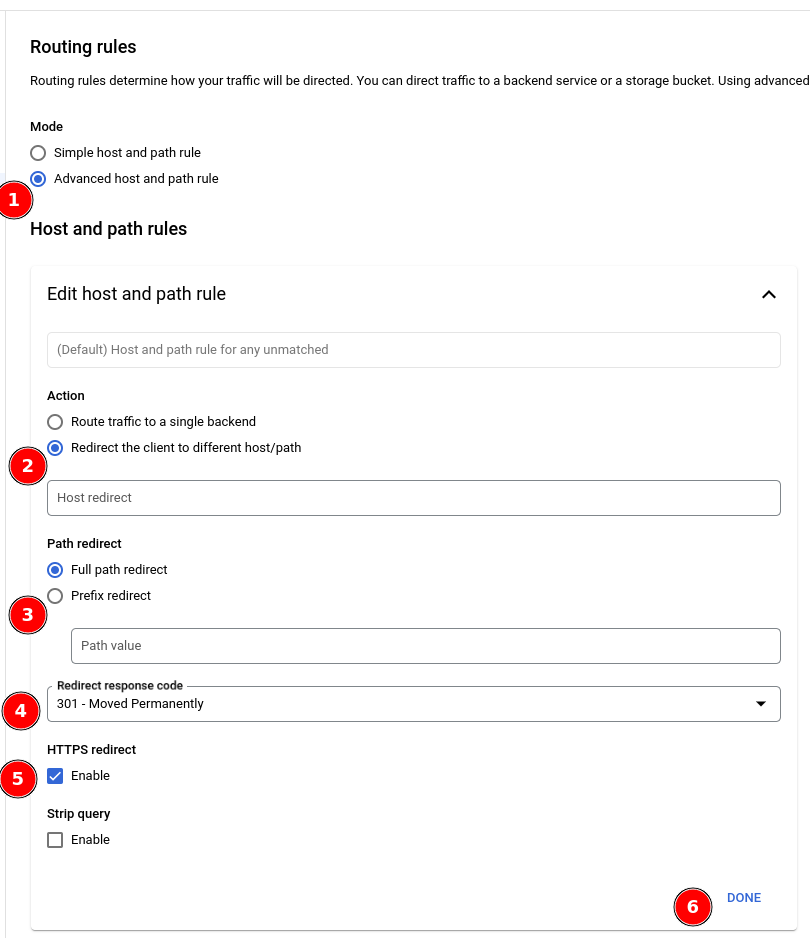
You will have to set up two unique Load Balancers for this purpose. The HTTP (port 80) Load Balancer will have certain routing rules configured in the advanced host and path rule section to force HTTP-traffic to the HTTPS-side with a 301 - Moved Permanently code. Routing rules configuration: 1. Mode: 1. 🔘 Advanced host and path rules 2. Host and path rules:
Edit host and path rule:
Action: 1. 🔘 Redirect the client to different host/path
- Path redirect:
- 🔘 Prefix redirect (GCP seems to re-configure this to the other setting as you save..)
- Redirect response code:
- 301 - Moved Permanently
- HTTPS redirect:
- ☑ Enable
- Done