Microsoft AD login
How to instruct new organizations to start using Microsoft login:
Customer needs to have Azure admin login to our auth both on nightly and stable to enable microsoft login. When logging in the application will ask admin to enable our login application to azure.
SSO kirjautumista varten teidän AAD admin pitäisi rekisteröidä Enterpise App kirjautumalla testiin ja tuotantoon erikseen.
Image links for environments: https://auth-nightly.attracs.com https://auth.attracs.com/
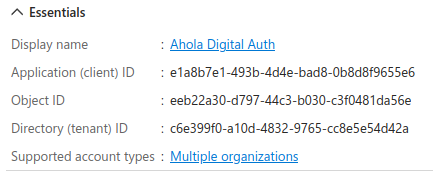
Ahola Digital auth application details
Navigation: Link:
Display name:
Ahola Digital Auth

Application (client) ID:
e1a8b7e1-493b-4d4e-bad8-0b8d8f9655e6

Object ID:
eeb22a30-d797-44c3-b030-c3f0481da56e

Directory (tenant) ID:
c6e399f0-a10d-4832-9765-cc8e5e54d42a

Supported account types:
Multiple organizations
 Hannu's instructions:
Application: Ahola Digital
Auth Application (client) ID: e1a8b7e1-493b-4d4e-bad8-0b8d8f9655e6
Directory (tenant) ID: c6e399f0-a10d-4832-9765-cc8e5e54d42a
Enterprise applications ➝ all applications ➝ create new application
Customer AD details (DO NOT SHARE THIS!)
The purpose of this image is to help us at Ahola Digital guide customers replicate Ahola Digital Auth application in customer's AD.
.png)