AO Rclone
Files arriving at Biztalk are copied to backup folder, then to GCP bucket and then moved to "read" folder where Biztalk take files.
Instructions for installing Rclone: https://rclone.org/install/ Instruction for basic commands to use Rclone: https://rclone.org/docs/ Instructions for configuring Rclone to Google Cloud Storage: https://rclone.org/googlecloudstorage/
GCP config:
* name of the remote : [" "]
* n) New remote
* choose number or type "google cloud storage" or (17)
* client id> blank
* client secret> blank
* project number> blank
* Service account file>
Connection work with GCP service account.
Here is drawio image of the function
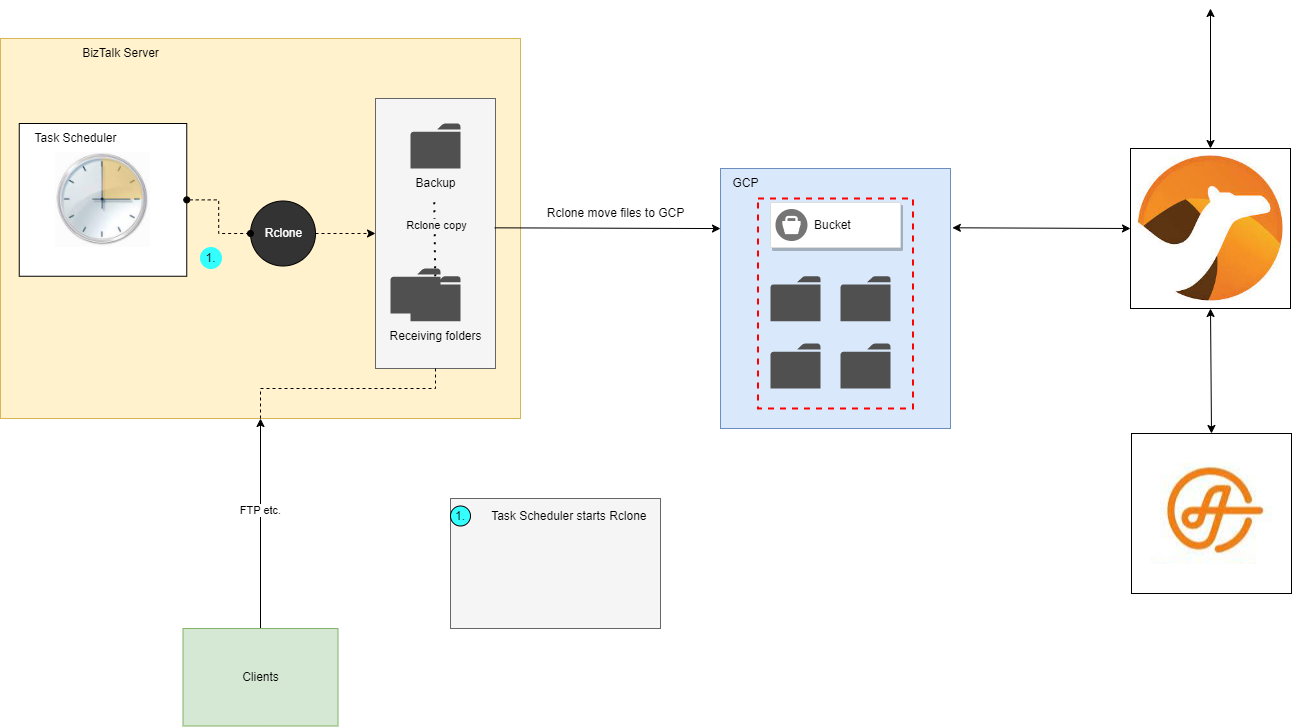
When configuring rclone remote it should named individually. e.g camel_dev or camel_nightly Each remote has to configure separated.
Rclone doesn't have a function to automate its operation. PowerShell Script, is given to Task Scheduler to automate rclone functions. The scheduled task is performed every 1 minute. A log file is required for the execution. The Script should create a new log file for each execution and name it according to the time. Event information is written to the created log file.
This is how we want Rclone to work:
- Rclone copies incoming files to the specified backup folder
- Rclone copies incoming files to the GCP bucket
- Rclone moves incoming files to the "read" folder, where Biztalk takes them
- In the Rclone folder there is a "Logs" folder, where comes log file on every day. Log file contains all the executions of the day.
- Rclone creates new log file on each day and name it as "log-yyyy-MM-dd.txt"
some kind base of the Script :
cd\
cd rclone

.\rclone.exe copy --log-file=\rclone\Logs\log-$(get-date -f yyyy-MM-dd).txt -vv C:\copy_folder\IncomingFiles \backup

.\rclone.exe copy --log-file=\rclone\Logs\log$(get-date -f yyyy-MM-dd).txt -vv c:\copy_folder\IncomingFiles camel_nightly:adi-camel-uploads-nightly/Transporeon

.\rclone.exe move --log-file=\rclone\Logs\log-$(get-date -f yyyy-MM-dd).txt -vv C:\copy_folder\IncomingFiles C:\copy_folder\ReadFolder
Copy biztalk2016test to GCP bucket:
rclone copy c:\test_rclone\Transporeon camel_dev:adi-camel-uploads-dev/Transporeon
rclone copy C:\test_rclone\Transporeon camel_nightly:adi-camel-uploads-nightly/Transporeon