GCP AO File backups
Reference task: File Backups (https://app.clickup.com/t/86c4c33p0)
Introduction
AO will handle big amount of individual files and save those to Windows disk. We want to have backup of all files so that we could restore those for ex disaster recovery purposes.
Backups are handled by Veeam.
Configuration
Veeam-pe (on-perm) 172.21.1.7 Veeam Backup and Replication (Master application)
Backendsrv-1 10.171.0.24 Veeam Agent
- Configuration is made in Veeam-pe machine with Veeam Backup and Replication app.
- In the Backup Infrastructure -section → add new server, our case is Backendsrv-1.
- Connection is made with
svc_attracs_service-service account (GCP AD).
Firewall
Fortigate
Ahola IT allowed connection between veeam-pe ↔backendsrv-1 in the Fortigate FW
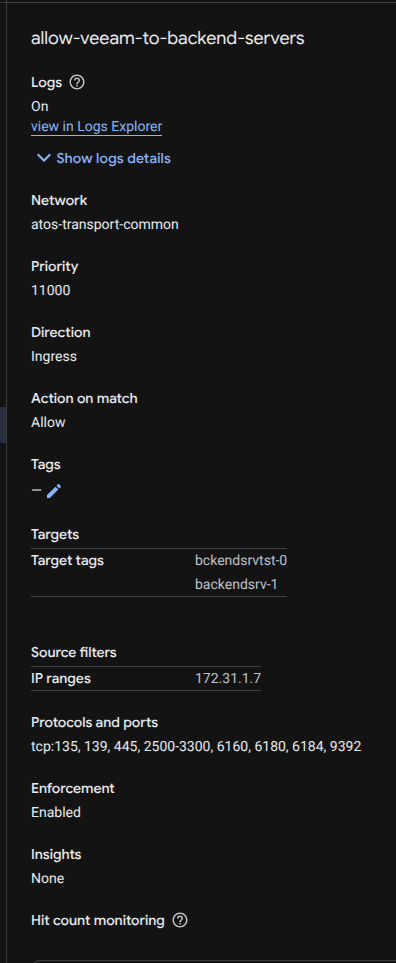
GCP FW (adi-networks -project)
allow rule from veeam to backendsrv-1:
Windows FW
allow rule veeam to backendsrv-1

Scheduling
Nightly - everyday at 12:00 AM
* Nightly bckendsrvtst-0 will reboot every night at 03:00 AM
Stable - everyday at 09:00 AM
* Stable backendsrv-1 will reboot every Thursday at 02:15 AM
Backup Job
-
From nightly backup job contains disks (C:\) & (D:\)
-
From stable backup job contains disks (C:\) & (D:\)