AO Logging
This document describes how AO-logging is handled in GCP environment. This page will give instructions how and where all steps are done.
Steps:
* Client and servers creates log files to NetApp volume.
* Bindplane agent tail logs to GCP.
* We have own project road-ao-logging in GCP where we route AO-logs.
* road-ao-logging -project has logging buckets for each customer.
* Logs sinks to each customers bucket.
* There is log based metrics for each types of logs (errors etc)
* Log based metrics will collect logs and Grafana will use those in dashboards.
* Alerts are triggered from Grafana Dashboard data and sent it to monitoring channels in Slack
AO-logs
AO generates logs to its home directory /log -folder by default. This way Ahola's and Special's AO is configured.
Ahola * Client:
\\172.31.162.130\smb-live\AholaTransport\live\Client\Log
- Servers:
\\172.31.162.130\smb-live\AholaTransport\live\Server\Log
- BatchRun:
\\172.31.162.130\smb-live\AholaTransport\live\BatchRun\Log
- Datapump
\\172.31.162.130\datapump\AholaTransport\AholaNightly\Log
\\172.31.162.130\datapump\AholaTransport\AholaNightly\Errors
\\172.31.162.130\datapump\AholaTransport\AholaNightly\Results

\\172.31.162.130\datapump\AholaTransport\AholaDaily\Log
\\172.31.162.130\datapump\AholaTransport\AholaDaily\Errors
\\172.31.162.130\datapump\AholaTransport\AholaDaily\Results
Special * Client:
\\172.31.162.130\smb-live\AholaSpecial\live\Client\Log
- Server:
\\172.31.162.130\smb-live\AholaSpecial\live\Server\Log
- BatchRun:
\\172.31.162.130\smb-live\AholaSpecial\live\BathcRun\Log
- Datapump:
\\172.31.162.130\datapump\AholaSpecial\Nightly\Log
\\172.31.162.130\datapump\AholaSpecial\Nightly\Errors
\\172.31.162.130\datapump\AholaSpecial\Nightly\Results

\\172.31.162.130\datapump\AholaSpecial\Daily\Log
\\172.31.162.130\datapump\AholaSpecial\Daily\Errors
\\172.31.162.130\datapump\AholaSpecial\Daily\Results
Bindplane
We use bindplane to tail logs to GCP logging.
Bindplane management console: * https://bindplane.bluemedora.com/logs/overview
On windows side there is Bindplane Log Agent and Bindplane Fluentd -services which collects the data.
Bindplane configs, logs etc:
C:\BlueMedora\BindplaneLogAgent
Bindplane destination gcp-ao-logging is configured to send tailed data to GCP logging with Service Account.
Service Account is only use in:
aholadigital.com\Infra\atos-transport\common\road-ao-logging -project
Configure bindplane destination: * https://docs.bindplaneoriginal.observiq.com/docs/google-stackdriver
Bindplane Agents are installed in these machines all GCP VM's are in one group gcp-ao , group is not necessary, but with that we can separate Azure AO (externals live) logging from GCP AO.
* Jump
* Jump-2
* backendsrv-1
* bckendsrvtst-0
* biztalktest-01
How to install bindplane agent: * https://docs.bindplaneoriginal.observiq.com/docs/universal-agent-installation How to remove bindplane agent: * https://docs.bindplaneoriginal.observiq.com/docs/universal-agent-removal
Bindplane Sources: * GCP-Ahola-clientlogs * GCP-Ahola-serverlogs * GCP-Special-clientlogs * GCP-Special-serverlogs * GCP-Ahola-TIP-serverlogs
How to new create bindplane source:
note that "path" is using normal slashes, not backslashes.
With "tag" we can easily search data in GCP from this source.
<source>
  @type tail
  path //172.31.162.130/smb-nightly0/AholaTransport/TIP/Server/Log/*
  pos_file {{{configPath}}}/{{{bundleConfigId}}}.tail.log.pos
  tag {{{bundleConfigId}}}.ahola-tip-serverlog
  format none
  limit_recently_modified 24h
  path_key tailed_path
</source>

<match {{{bundleConfigId}}}.**>
  @type record_reformer
  tag ${tag_suffix[1]}
  <record>
    bindplane_source_name "{{{bundleConfigName}}}"
    bindplane_source_id {{{bundleConfigId}}}
    bindplane_source_type "tail"
  </record>
</match>
GCP logging
We have own project road-ao-logging in GCP where we route AO-logs.
* https://console.cloud.google.com/logs/query;query=%0A;cursorTimestamp=2024-07-08T13:34:39.244041Z;duration=PT1H?project=road-ao-logging-57348
Bindplane source tag is shown in Logs Explorer ➝ All log names:
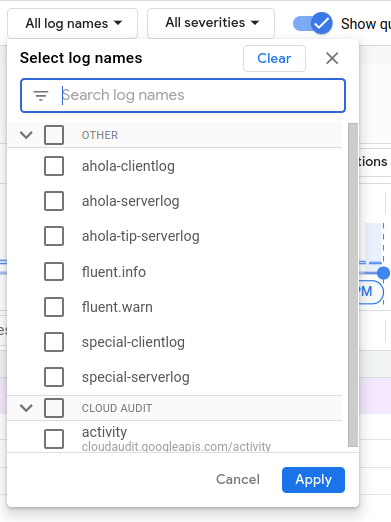 Saved "tab" contains useful saved log queries.
Log storage
https://console.cloud.google.com/logs/storage?project=road-ao-logging-57348
By default all logs are routed to _default -bucket, which retention period is 30 days.

Each customer will have own log bucket where we are going to sink AO-logs. These log buckets retention period will be at least 180 days.
Log Routing
All AO logs are routed to own log bucked by sink.

You can sink lot of different data with sink.
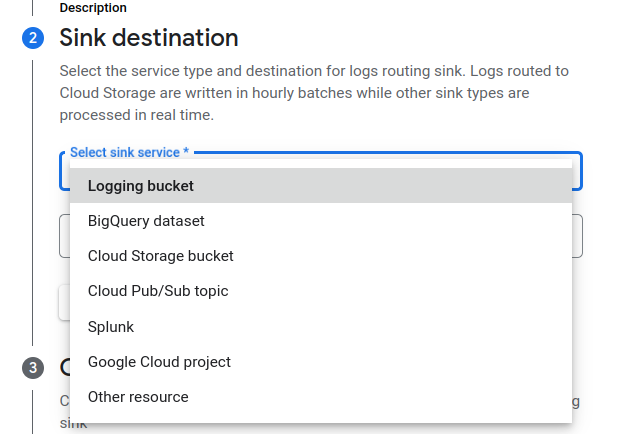 You can sink log between projects etc.
Log Based Metrics
Log Based metrics collects logs which contains specified information in log names from our sources. We can create queries which shows different things like errors etc. in specified log. * https://console.cloud.google.com/logs/metrics?project=road-ao-logging-57348 With log based metrics we have made Grafana dashboards, which gives lot of information about AO-logs.
Monitoring & Alerting
With Log based metrics we can monitor our clients and servers. Grafana Dashboards contains counters which calculates for example errors occurring in client logs.
Alerts are specified to read dashboards and send alert message to monitoring channel in Slack.
Client log dashboard: * https://dash.aholadigital.com/d/564rfth5/log-digest-clients?orgId=1 Server log dashboard: * https://dash.aholadigital.com/d/b009b5cc-45cb-4acf-8399-f0e051be0cf7/log-digest-server?orgId=1