AO Database optimization
Categorize fragmentation percentage – Microsoft suggests that we rebuild indexes when we have greater than 30% fragmentation and reorganize when they are in between 5% and 30% fragmentation.
Check fragmented tables
SELECT S.name as 'Schema',
T.name as 'Table',
I.name as 'Index',
DDIPS.avg_fragmentation_in_percent,
DDIPS.page_count
FROM sys.dm_db_index_physical_stats (DB_ID(), NULL, NULL, NULL, NULL) AS DDIPS
INNER JOIN sys.tables T on T.object_id = DDIPS.object_id
INNER JOIN sys.schemas S on T.schema_id = S.schema_id
INNER JOIN sys.indexes I ON I.object_id = DDIPS.object_id
AND DDIPS.index_id = I.index_id
WHERE DDIPS.database_id = DB_ID()
and I.name is not null
AND DDIPS.avg_fragmentation_in_percent > 0
ORDER BY DDIPS.avg_fragmentation_in_percent desc
Check fragmented tables, page count > 10000
SELECT S.name as 'Schema',
T.name as 'Table',
I.name as 'Index',
DDIPS.avg_fragmentation_in_percent,
DDIPS.page_count
FROM sys.dm_db_index_physical_stats (DB_ID(), NULL, NULL, NULL, NULL) AS DDIPS
INNER JOIN sys.tables T on T.object_id = DDIPS.object_id
INNER JOIN sys.schemas S on T.schema_id = S.schema_id
INNER JOIN sys.indexes I ON I.object_id = DDIPS.object_id
AND DDIPS.index_id = I.index_id
WHERE DDIPS.database_id = DB_ID()
and I.name is not null
AND DDIPS.avg_fragmentation_in_percent > 0
AND DDIPS.page_count > 10000
ORDER BY DDIPS.avg_fragmentation_in_percent desc
Rebuild indexes with include method
DECLARE @Database NVARCHAR(255)
DECLARE @Table NVARCHAR(255)
DECLARE @cmd NVARCHAR(1000)

DECLARE DatabaseCursor CURSOR READ_ONLY FOR
SELECT name FROM master.sys.databases
--WHERE name NOT IN ('master','msdb','tempdb','model','distribution','Ahola_AO_Live','Special_AO_Live')  -- databases to exclude
WHERE name IN ('DB1', 'DB2') -- use this to select specific databases and comment out line above
AND state = 0 -- database is online
AND is_in_standby = 0 -- database is not read only for log shipping
ORDER BY 1

OPEN DatabaseCursor

FETCH NEXT FROM DatabaseCursor INTO @Database
WHILE @@FETCH_STATUS = 0
BEGIN

   SET @cmd = 'DECLARE TableCursor CURSOR READ_ONLY FOR SELECT ''['' + table_catalog + ''].['' + table_schema + ''].['' +
   table_name + '']'' as tableName FROM [' + @Database + '].INFORMATION_SCHEMA.TABLES WHERE table_type = ''BASE TABLE'''

   -- create table cursor
   EXEC (@cmd)
   OPEN TableCursor

   FETCH NEXT FROM TableCursor INTO @Table
   WHILE @@FETCH_STATUS = 0
   BEGIN
      BEGIN TRY
         SET @cmd = 'ALTER INDEX ALL ON ' + @Table + ' REBUILD'
         PRINT @cmd -- uncomment if you want to see commands
         EXEC (@cmd)
      END TRY
      BEGIN CATCH
         PRINT '---'
         PRINT @cmd
         PRINT ERROR_MESSAGE()
         PRINT '---'
      END CATCH

      FETCH NEXT FROM TableCursor INTO @Table
   END

   CLOSE TableCursor
   DEALLOCATE TableCursor

   FETCH NEXT FROM DatabaseCursor INTO @Database
END
CLOSE DatabaseCursor
DEALLOCATE DatabaseCursor
REORGANIZE and include method
DECLARE @Database NVARCHAR(255)
DECLARE @Table NVARCHAR(255)
DECLARE @cmd NVARCHAR(1000)

DECLARE DatabaseCursor CURSOR READ_ONLY FOR
SELECT name FROM master.sys.databases
--WHERE name NOT IN ('master','msdb','tempdb','model','distribution','Ahola_AO_Live','Ahola_datapump','DataPump_PlanKPI','datapumpATSpecial','datapumpATSpecialKPI','Special_AO_Live','Special_AO_Live_old')  -- databases to exclude
WHERE name IN ('Ahola_AO_RC') -- use this to select specific databases and comment out line above
AND state = 0 -- database is online
AND is_in_standby = 0 -- database is not read only for log shipping
ORDER BY 1

OPEN DatabaseCursor

FETCH NEXT FROM DatabaseCursor INTO @Database
WHILE @@FETCH_STATUS = 0
BEGIN

   SET @cmd = 'DECLARE TableCursor CURSOR READ_ONLY FOR SELECT ''['' + table_catalog + ''].['' + table_schema + ''].['' +
   table_name + '']'' as tableName FROM [' + @Database + '].INFORMATION_SCHEMA.TABLES WHERE table_type = ''BASE TABLE'''

   -- create table cursor
   EXEC (@cmd)
   OPEN TableCursor

   FETCH NEXT FROM TableCursor INTO @Table
   WHILE @@FETCH_STATUS = 0
   BEGIN
      BEGIN TRY
         SET @cmd = 'ALTER INDEX ALL ON ' + @Table + ' REORGANIZE'
         PRINT @cmd -- uncomment if you want to see commands
         EXEC (@cmd)
      END TRY
      BEGIN CATCH
         PRINT '---'
         PRINT @cmd
         PRINT ERROR_MESSAGE()
         PRINT '---'
      END CATCH

      FETCH NEXT FROM TableCursor INTO @Table
   END

   CLOSE TableCursor
   DEALLOCATE TableCursor

   FETCH NEXT FROM DatabaseCursor INTO @Database
END
CLOSE DatabaseCursor
DEALLOCATE DatabaseCursor
Different SQL script to Rebuild & Reorganize indexes:
Rebuild & Reorganize index:
* run directly to db, not to master.
* These scripts below works in Azure, scripts above doesn't
USE [database_name]; -- Ensure operations run only on this database
GO

DECLARE @IndexName NVARCHAR(128)
DECLARE @TableName NVARCHAR(128)
DECLARE @SchemaName NVARCHAR(128)
DECLARE @SQL NVARCHAR(MAX)
DECLARE @Fragmentation FLOAT

-- Cursor to fetch fragmented indexes only for the current database
DECLARE cur CURSOR FOR
SELECT S.name as SchemaName,
       T.name as TableName,
       I.name as IndexName,
       DDIPS.avg_fragmentation_in_percent
FROM sys.dm_db_index_physical_stats(DB_ID(), NULL, NULL, NULL, 'LIMITED') AS DDIPS
INNER JOIN sys.tables T ON T.object_id = DDIPS.object_id
INNER JOIN sys.schemas S ON T.schema_id = S.schema_id
INNER JOIN sys.indexes I ON I.object_id = DDIPS.object_id
AND DDIPS.index_id = I.index_id
WHERE I.name IS NOT NULL
AND DDIPS.avg_fragmentation_in_percent > 5 -- Only consider fragmentation above 5%
ORDER BY DDIPS.avg_fragmentation_in_percent DESC;

OPEN cur

FETCH NEXT FROM cur INTO @SchemaName, @TableName, @IndexName, @Fragmentation

WHILE @@FETCH_STATUS = 0
BEGIN
    SET @SQL = 'ALTER INDEX ' + QUOTENAME(@IndexName) + ' ON ' + QUOTENAME(@SchemaName) + '.' + QUOTENAME(@TableName)

    IF @Fragmentation >= 30
        SET @SQL = @SQL + ' REBUILD'
    ELSE IF @Fragmentation >= 5
        SET @SQL = @SQL + ' REORGANIZE'

    PRINT @SQL -- Prints the SQL command that will be executed
    EXEC sp_executesql @SQL -- Execute the command

    FETCH NEXT FROM cur INTO @SchemaName, @TableName, @IndexName, @Fragmentation
END

CLOSE cur
DEALLOCATE cur
Only Rebuild, Reorganize disabled:
USE [database_name]; -- Ensure operations run only on this database
GO

DECLARE @IndexName NVARCHAR(128)
DECLARE @TableName NVARCHAR(128)
DECLARE @SchemaName NVARCHAR(128)
DECLARE @SQL NVARCHAR(MAX)
DECLARE @Fragmentation FLOAT

-- Cursor to fetch fragmented indexes only for the current database
DECLARE cur CURSOR FOR
SELECT S.name as SchemaName,
       T.name as TableName,
       I.name as IndexName,
       DDIPS.avg_fragmentation_in_percent
FROM sys.dm_db_index_physical_stats(DB_ID(), NULL, NULL, NULL, 'LIMITED') AS DDIPS
INNER JOIN sys.tables T ON T.object_id = DDIPS.object_id
INNER JOIN sys.schemas S ON T.schema_id = S.schema_id
INNER JOIN sys.indexes I ON I.object_id = DDIPS.object_id
AND DDIPS.index_id = I.index_id
WHERE I.name IS NOT NULL
AND DDIPS.avg_fragmentation_in_percent > 30 -- Only consider fragmentation above 30% for rebuild
ORDER BY DDIPS.avg_fragmentation_in_percent DESC;

OPEN cur

FETCH NEXT FROM cur INTO @SchemaName, @TableName, @IndexName, @Fragmentation

WHILE @@FETCH_STATUS = 0
BEGIN
    SET @SQL = 'ALTER INDEX ' + QUOTENAME(@IndexName) + ' ON ' + QUOTENAME(@SchemaName) + '.' + QUOTENAME(@TableName)

    -- Only rebuild indexes with fragmentation >= 30%
    IF @Fragmentation >= 30
        SET @SQL = @SQL + ' REBUILD'

    -- ELSE IF block for REORGANIZE is removed/commented out
    -- ELSE IF @Fragmentation >= 5
    --     SET @SQL = @SQL + ' REORGANIZE'

    PRINT @SQL -- Prints the SQL command that will be executed
    EXEC sp_executesql @SQL -- Execute the command

    FETCH NEXT FROM cur INTO @SchemaName, @TableName, @IndexName, @Fragmentation
END

CLOSE cur
DEALLOCATE cur
Check transaction log file:
DBCC SQLPERF(logspace)
- run this to shrink it to 500mb. Run directly to database:
DBCC SHRINKFILE (N'log', 500);
- check log file size again
Or
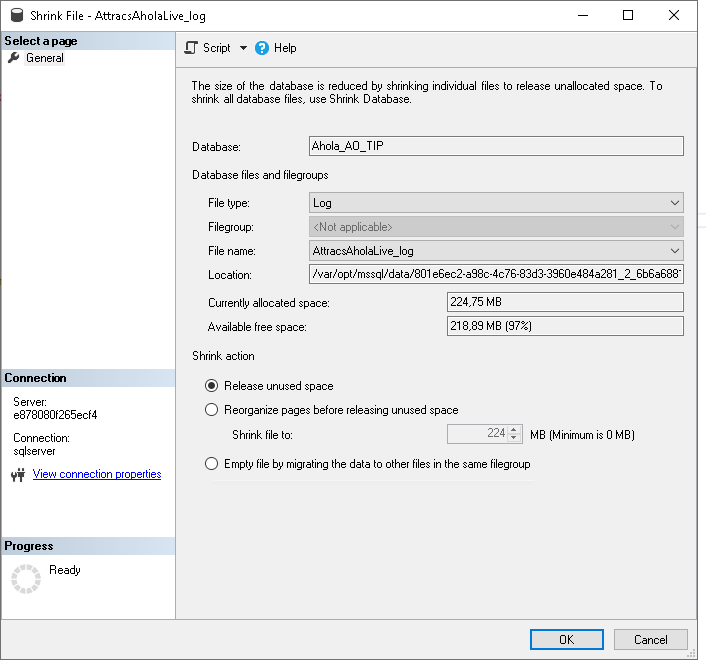
Right click database → Tasks
* Shrink → Files
* File Type: Drop down menu, select Log.